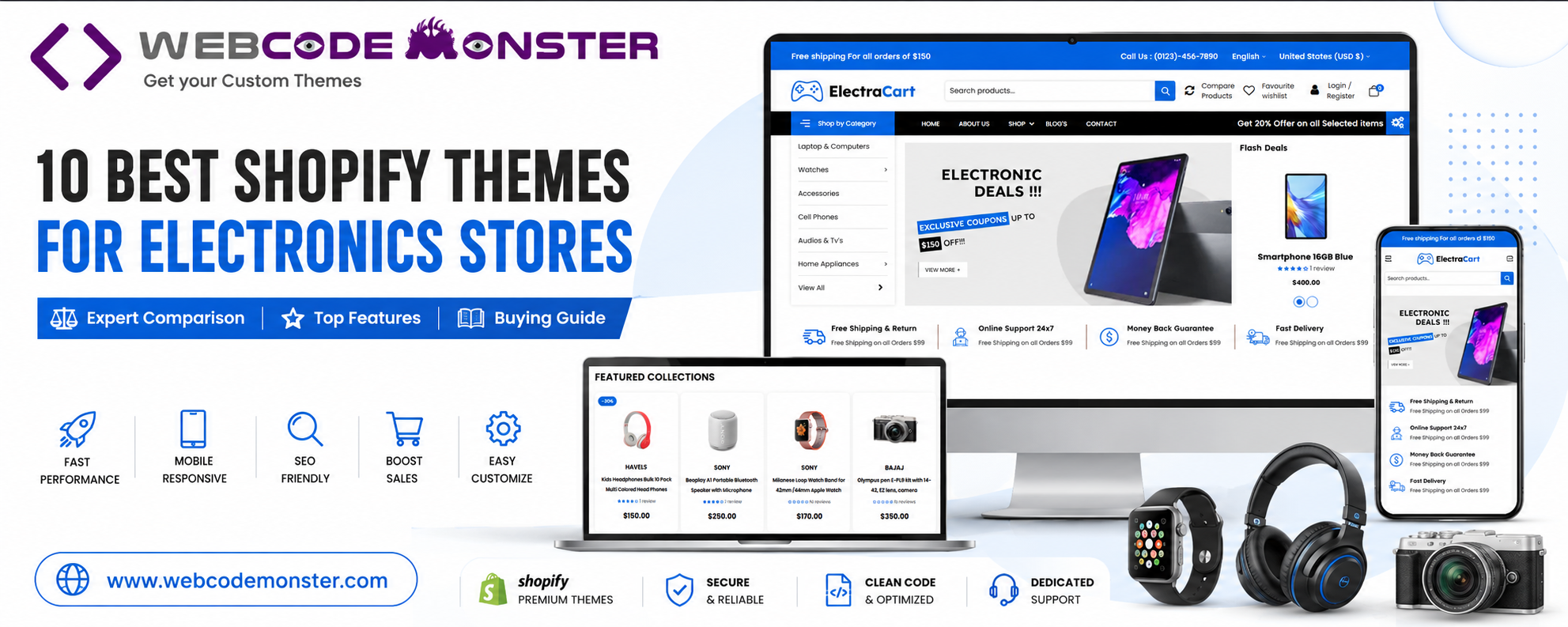
Build a High-Converting Electronics Store with the Right Shopify Theme
Launching an online electronics store is more competitive than ever. Whether you’re selling smartphones, laptops, gaming accessories, smart home devices, consumer electronics, LED lighting, computer peripherals, or mobile accessories, your website needs to do much more than simply display products.
Modern online shoppers expect a fast-loading website, intuitive navigation, powerful search functionality, mobile-friendly browsing, secure shopping, and a seamless checkout experience. Even if you offer excellent products at competitive prices, an outdated or poorly optimized Shopify theme can negatively impact user experience, increase bounce rates, and reduce conversions.
Choosing the right Shopify theme is one of the most important decisions you’ll make when building your electronics business. A well-designed theme helps customers discover products quickly, builds trust in your brand, improves search engine visibility, and ultimately increases online sales.
In this comprehensive guide, we’ve reviewed some of the best Shopify themes for electronics stores available in 2026. Our list includes premium themes developed specifically for electronics retailers as well as trusted multipurpose Shopify themes that perform exceptionally well for gadget stores, technology retailers, mobile phone shops, lighting businesses, and consumer electronics brands.
Whether you’re starting a new Shopify store or planning to redesign an existing electronics website, this guide will help you choose the right theme based on your business goals, product catalog, and customer experience requirements.
Why Choosing the Right Shopify Theme Matters
Many store owners spend weeks selecting products and planning marketing campaigns but give very little attention to their website theme. Unfortunately, this can become one of the biggest obstacles to long-term success.
A Shopify theme isn’t just about appearance—it’s the foundation of your online store. It influences how customers browse products, interact with your website, and complete purchases. The right theme creates a smooth shopping experience, while the wrong one can frustrate visitors and lead to abandoned carts.
For electronics stores, where customers often compare multiple products before making a purchase, navigation and usability become even more important. Features such as category organization, live search, product filtering, promotional banners, and mobile responsiveness play a significant role in improving conversions.
A high-quality Shopify theme also supports search engine optimization (SEO), helping your store rank for valuable keywords such as:
- Shopify electronics theme
- Best Shopify theme for electronics store
- Gadget store Shopify theme
- Technology Shopify template
- Electronics website template
- Mobile accessories Shopify theme
- Consumer electronics eCommerce theme
As Google continues to prioritize page experience, Core Web Vitals, and mobile usability, selecting a fast and optimized Shopify theme becomes even more critical.
How We Selected the Best Shopify Themes
Rather than choosing themes based solely on appearance, we evaluated each one using practical criteria that matter to real online businesses.
Design & User Experience
A professional layout helps build trust and keeps customers engaged. We looked for themes with clean product pages, intuitive navigation, and modern visual design.
Product Discovery
Electronics stores often manage hundreds or even thousands of products. Themes with mega menus, Ajax search, advanced filtering, and category organization scored significantly higher.
Mobile Performance
With a large percentage of online shoppers browsing from smartphones, responsive design is no longer optional. Every theme on this list performs well across mobile, tablet, and desktop devices.
Speed & Performance
Fast-loading websites improve user satisfaction and contribute to better search engine rankings. We considered themes that focus on optimized code, efficient layouts, and smooth browsing experiences.
SEO Readiness
A strong technical foundation helps improve visibility in search engines. We preferred themes with clean coding practices, structured layouts, and excellent compatibility with Shopify’s SEO capabilities.
Customization
Every electronics business has unique branding requirements. Themes offering flexible customization options, reusable sections, and easy editing received higher ratings.
✔ Conversion Features
The best Shopify themes help convert visitors into customers through strategically placed promotional sections, featured products, quick shopping functionality, and engaging product displays.
Comparison Table – Best Shopify Themes for Electronics Stores
| Rank | Theme | Best For | Mobile Friendly | SEO Ready | Our Rating |
|---|---|---|---|---|---|
| ⭐ | ElectraCart | Electronics, Gadgets & Tech Stores | ✅ | ✅ | ⭐⭐⭐⭐⭐ |
| ⭐ | V2Lamp | LED Lighting & Electrical Stores | ✅ | ✅ | ⭐⭐⭐⭐⭐ |
| 3 | Kalles | Multi-purpose Electronics Stores | ✅ | ✅ | ⭐⭐⭐⭐☆ |
| 4 | Empire | Enterprise Electronics Stores | ✅ | ✅ | ⭐⭐⭐⭐☆ |
| 5 | Electro | Consumer Electronics Websites | ✅ | ✅ | ⭐⭐⭐⭐☆ |
| 6 | Gecko | Electronics & Gadget Stores | ✅ | ✅ | ⭐⭐⭐⭐☆ |
| 7 | DigitalWorld | Multi-brand Electronics Stores | ✅ | ✅ | ⭐⭐⭐⭐☆ |
| 8 | Electbox | Gadget & Electronics Shops | ✅ | ✅ | ⭐⭐⭐⭐☆ |
| 9 | TechMarket | Large Electronics Marketplaces | ✅ | ✅ | ⭐⭐⭐⭐☆ |
| 10 | Tonmart | Electronics & Tech Retailers | ✅ | ✅ | ⭐⭐⭐⭐☆ |
1. ElectraCart – Best Overall Shopify Theme for Electronics Stores ⭐ Editor’s Choice
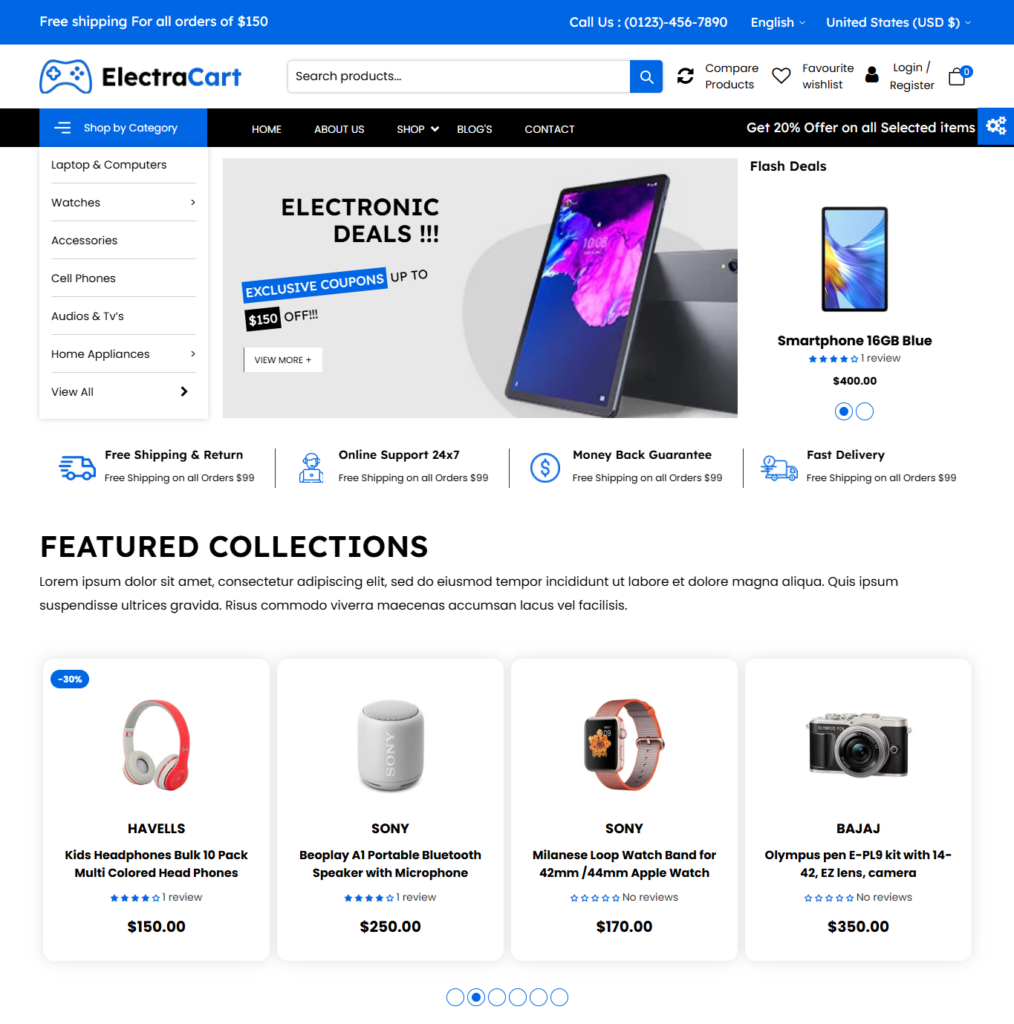
When it comes to creating a professional electronics eCommerce website, ElectraCart stands out as one of the strongest options available. Designed specifically for electronics retailers, the theme focuses on speed, usability, and conversion optimization while maintaining a clean and modern appearance.
Unlike generic Shopify themes that require extensive customization, ElectraCart is built around the needs of technology businesses. From smartphones and laptops to gaming accessories, smart gadgets, computer peripherals, cameras, and consumer electronics, every section is designed to showcase products professionally.
One of the biggest strengths of ElectraCart is its intelligent product navigation. The built-in mega menu allows store owners to organize large product catalogs into clearly structured categories, making it easy for customers to browse thousands of products without feeling overwhelmed. Ajax-powered live search further enhances the shopping experience by providing instant search suggestions and reducing the time required to locate specific products.
The homepage includes dedicated areas for promotional banners, featured collections, trending products, new arrivals, and special offers. These strategically positioned sections help capture customer attention while encouraging users to explore more products throughout the store.
From a performance perspective, ElectraCart is optimized for fast loading and responsive browsing across smartphones, tablets, laptops, and desktop computers. Combined with its SEO-friendly structure, the theme provides a strong technical foundation for businesses looking to improve search engine visibility while delivering an excellent customer experience.
Best For
- Electronics Stores
- Gadget Retailers
- Smartphone Shops
- Mobile Accessories Stores
- Computer & Laptop Retailers
- Gaming Equipment Stores
- Consumer Electronics Businesses
Pros
✔ Designed specifically for electronics stores
✔ Ajax live search
✔ Mega menu navigation
✔ Conversion-focused homepage
✔ Fast loading performance
✔ Mobile responsive
✔ SEO-friendly structure
✔ Easy customization
2. V2Lamp – Best Shopify Theme for Lighting & Electrical Stores
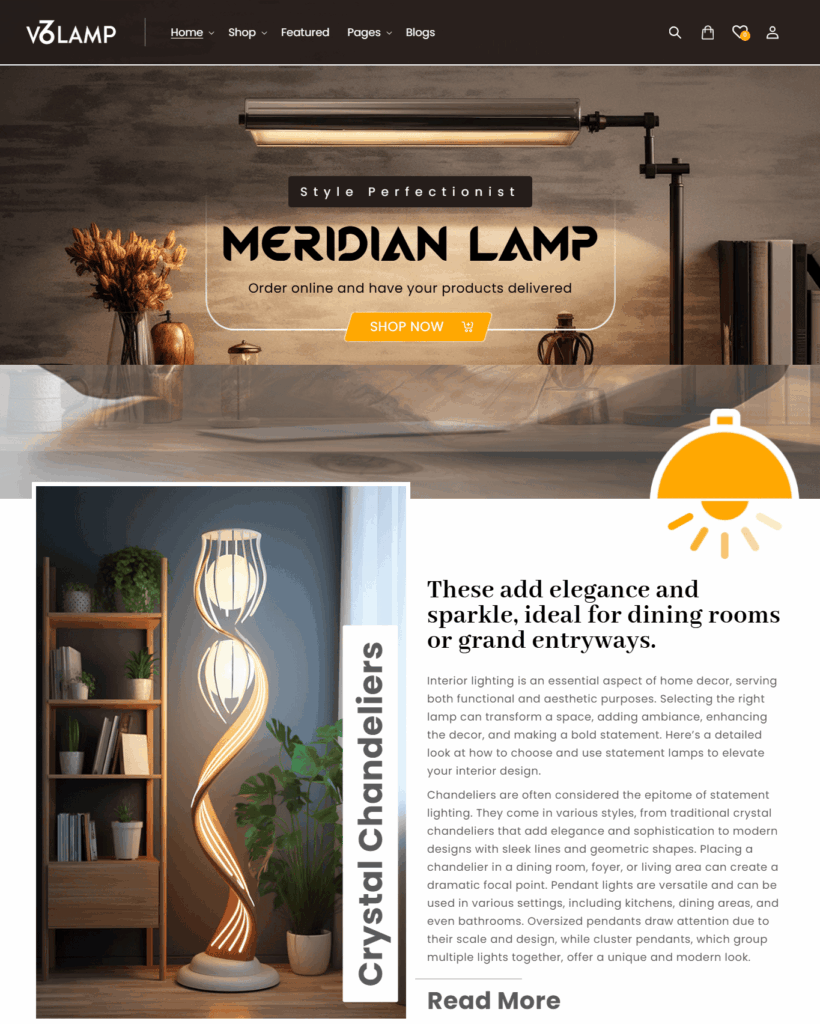
While many Shopify themes target general electronics businesses, V2Lamp focuses specifically on businesses selling lighting products and electrical solutions. This makes it an excellent choice for stores specializing in LED lights, decorative lighting, smart lighting systems, ceiling lights, wall lights, outdoor lighting, industrial lighting, electrical accessories, and home illumination products.
The theme combines elegant design with practical eCommerce functionality. Product categories are clearly organized, helping customers browse lighting collections based on room type, product category, application, or lighting style.
Large promotional banners provide an ideal space for showcasing seasonal offers, new product launches, clearance sales, and featured lighting collections. Product grids are designed to highlight images, pricing, and important product information without overwhelming visitors.
V2Lamp also provides responsive layouts, smooth navigation, and optimized shopping experiences across all devices, making it suitable for both residential and commercial lighting businesses.
Best For
- LED Lighting Stores
- Home Lighting Retailers
- Electrical Product Stores
- Decorative Lighting Shops
- Smart Lighting Businesses
- Commercial Lighting Suppliers
- Interior Lighting Brands
Pros
✔ Beautiful lighting-focused design
✔ Clean product presentation
✔ Promotional homepage banners
✔ Mobile responsive
✔ Fast browsing experience
✔ SEO-ready layout
✔ Ideal for lighting retailers
3. Kalles – Best Multipurpose Shopify Theme for Electronics Stores
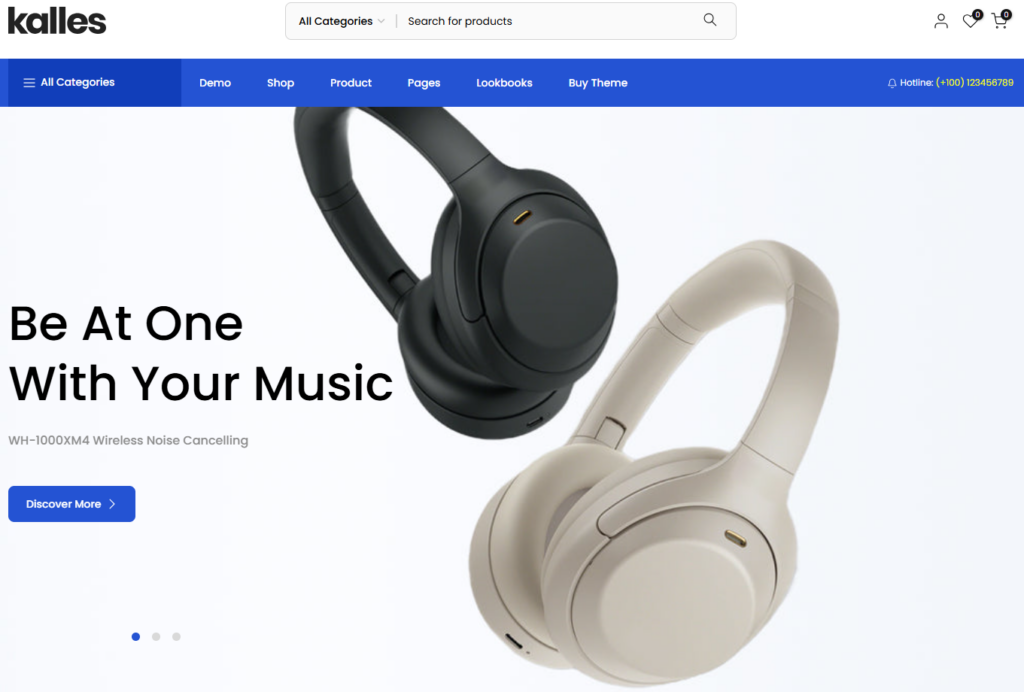
Kalles has earned its reputation as one of the most versatile premium Shopify themes available today. While it supports numerous industries, its dedicated electronics demos and extensive customization capabilities make it an excellent choice for technology retailers, gadget shops, and consumer electronics businesses. With dozens of professionally designed homepage layouts, Kalles allows merchants to launch an online electronics store without starting from scratch.
One of Kalles’ biggest advantages is flexibility. Whether you’re selling smartphones, laptops, gaming consoles, smart home devices, audio systems, wearable technology, or mobile accessories, the theme provides layouts that can be adapted to match your product catalog and brand identity.
For larger stores, Kalles includes advanced navigation, smart product filtering, promotional banners, countdown timers, quick product views, product variation swatches, and upselling sections that help improve the overall shopping experience while increasing average order value.
Performance is another area where Kalles excels. The theme is optimized for mobile devices, fast page loading, and modern SEO practices, ensuring customers enjoy a seamless browsing experience across every device.
Best For
- Electronics Stores
- Gadget Shops
- Smartphone Retailers
- Computer Stores
- Multi-category Technology Businesses
Pros
✔ Multiple electronics demo layouts
✔ Smart product filtering
✔ Ajax search & quick view
✔ Highly customizable
✔ Excellent mobile performance
✔ SEO-friendly structure
Cons
✖ Large number of options may require additional setup time
4. Empire – Best Shopify Theme for Enterprise Electronics Stores
Empire is built for businesses managing extensive product catalogs and high-volume online sales. Inspired by leading eCommerce marketplaces, the theme is particularly suitable for electronics retailers that sell products across multiple categories and brands.
The theme’s structured navigation, advanced filtering, and merchandising tools allow customers to browse thousands of products without feeling overwhelmed. Dedicated promotional areas make it easy to highlight seasonal sales, featured products, and limited-time offers.
Empire also offers responsive layouts, clean product pages, and a professional shopping experience that works exceptionally well for businesses selling computers, consumer electronics, networking equipment, appliances, and technology accessories.
Best For
- Enterprise Electronics Stores
- Large Technology Retailers
- Multi-brand Electronics Websites
- Wholesale Electronics Businesses
Pros
✔ Excellent for large catalogs
✔ Advanced filtering options
✔ Marketplace-inspired navigation
✔ Strong merchandising features
✔ Mobile responsive
✔ SEO optimized
Cons
✖ Premium pricing
5. Electro – Best Shopify Theme for Consumer Electronics Websites

Electro is one of the few Shopify themes created specifically for electronics retailers. Its clean layouts, organized product presentation, and technology-focused homepage designs make it a favorite among businesses selling gadgets, smartphones, computers, cameras, gaming products, and digital accessories.
The theme includes dedicated electronics demos, responsive layouts, advanced search capabilities, product comparison functionality, and promotional sections that help customers evaluate products before making a purchase.
Whether you’re launching a single-brand electronics store or a multi-category gadget website, Electro provides an intuitive shopping experience designed specifically for technology products.
Best For
- Electronics Stores
- Gadget Retailers
- Camera Stores
- Smartphone Shops
- Gaming Equipment Stores
Pros
✔ Purpose-built for electronics
✔ Product comparison support
✔ Modern technology layouts
✔ Mobile responsive
✔ SEO-friendly design
✔ Fast loading performance
Cons
✖ Fewer niche demos outside electronics
6. Gecko – Best Shopify Theme for Electronics & Gadget Stores
Gecko is a feature-rich Shopify theme that combines elegant design with outstanding flexibility. Its electronics demos make it suitable for technology retailers looking for a modern storefront that balances aesthetics with functionality.
Large hero banners, responsive product grids, Ajax search, smart filters, and promotional blocks help businesses showcase electronics professionally while improving navigation for customers.
Gecko also supports numerous conversion-focused features such as countdown timers, trust badges, free shipping bars, and product variation swatches that encourage purchasing decisions.
Best For
- Gadget Stores
- Consumer Electronics Retailers
- Mobile Accessories Shops
- Technology Brands
Pros
✔ Electronics demo available
✔ Modern responsive layouts
✔ Excellent customization
✔ Conversion-focused features
✔ Smart filtering
✔ SEO optimized
Cons
✖ Some advanced features require initial configuration
7. DigitalWorld – Best Shopify Theme for Multi-Brand Electronics Stores
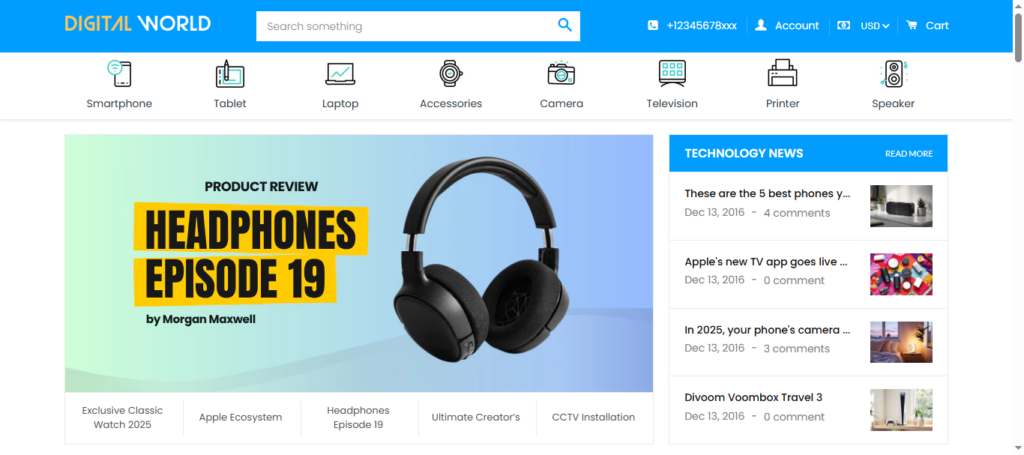
DigitalWorld is specifically designed for retailers managing multiple electronics brands under one website. Its homepage layouts emphasize product organization, promotional campaigns, and easy navigation, making it an excellent solution for stores selling laptops, smartphones, televisions, gaming consoles, networking equipment, and accessories.
The theme includes mega menus, product sliders, promotional banners, advanced filtering, and structured category pages that simplify browsing even when managing thousands of products.
Best For
- Multi-brand Electronics Stores
- Consumer Electronics Retailers
- Large Gadget Websites
- Technology Distributors
Pros
✔ Electronics-focused layouts
✔ Excellent category organization
✔ Mega menu support
✔ Promotional homepage sections
✔ Responsive design
✔ SEO-ready
Cons
✖ Better suited for medium to large stores
8. Electbox – Best Shopify Theme for Gadget & Electronics Shops
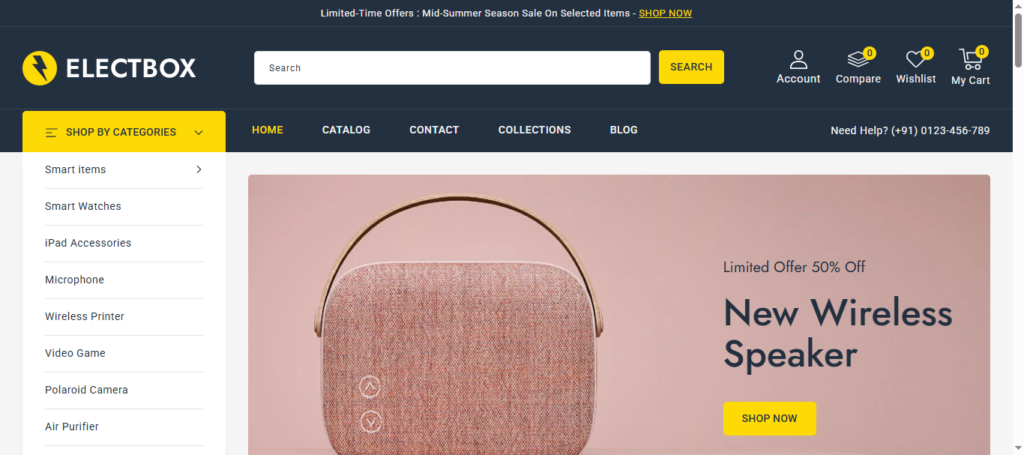
Electbox is designed specifically for electronics retailers seeking a modern shopping experience. With multiple homepage demos, product filtering, wishlist functionality, comparison tools, and countdown timers, it offers many built-in features that reduce dependence on third-party apps.
Its clean layouts and conversion-focused sections help merchants present gadgets, smartphones, accessories, and smart devices professionally while improving customer engagement.
Best For
- Gadget Stores
- Smartphone Retailers
- Consumer Electronics Shops
- Technology Businesses
Pros
✔ Electronics-specific demos
✔ Built-in wishlist
✔ Product comparison
✔ Countdown timers
✔ Mobile optimized
✔ SEO-friendly
Cons
✖ Feature-rich interface may require familiarization
9. TechMarket – Best Shopify Theme for Large Electronics Marketplaces
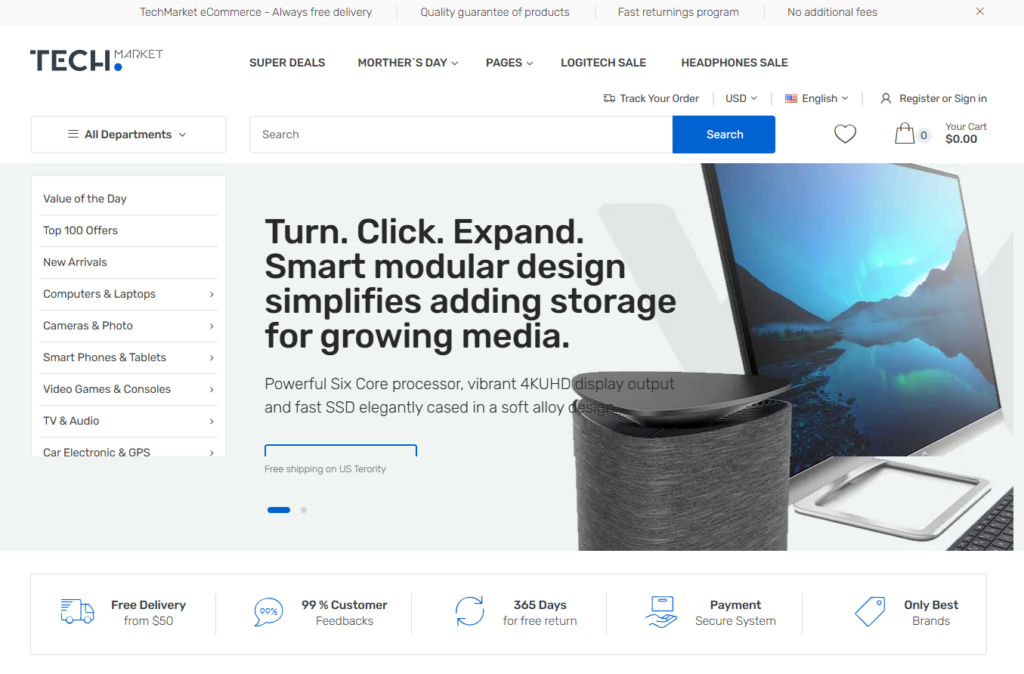
TechMarket is designed for businesses operating extensive online electronics marketplaces. Inspired by large technology retailers, the theme offers structured layouts, advanced navigation, vendor-friendly organization, and product comparison features that simplify shopping across multiple categories.
Its organized homepage sections, category navigation, and promotional areas make it particularly suitable for businesses selling thousands of products from multiple brands.
Best For
- Electronics Marketplaces
- Technology Retailers
- Multi-brand Stores
- Enterprise Businesses
Pros
✔ Marketplace-style design
✔ Large catalog support
✔ Advanced navigation
✔ Product comparison
✔ Responsive design
✔ Strong SEO structure
Cons
✖ Better suited for experienced merchants
10. Tonmart – Best Shopify Theme for Modern Electronics Retailers
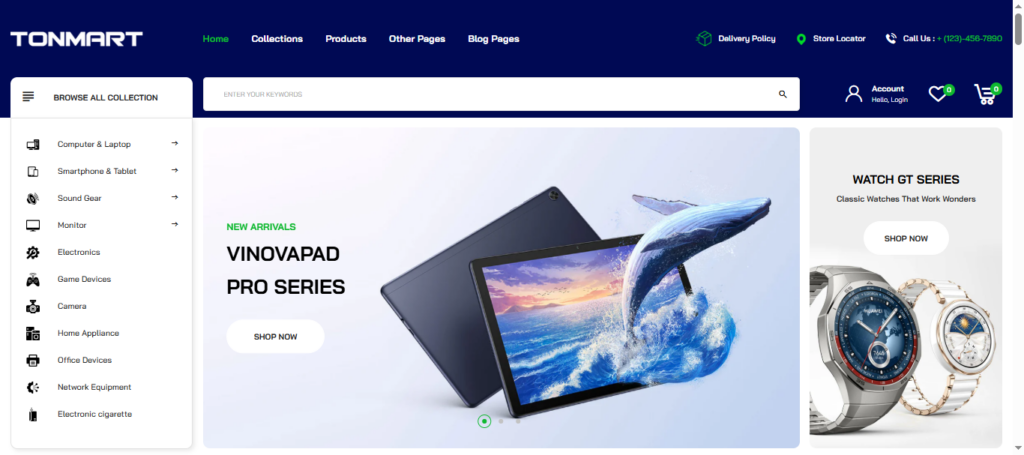
Tonmart is a Shopify OS 2.0 theme created for electronics, gadgets, and technology retailers looking for flexibility and performance. It includes multiple homepage demos, advanced filtering, mega menus, promotional banners, and responsive layouts that help merchants create professional online stores quickly.
Its modern interface makes it suitable for businesses selling smartphones, computers, gaming accessories, wearable technology, and digital products while maintaining excellent performance across devices.
Best For
- Electronics Stores
- Gadget Retailers
- Technology Startups
- Computer Accessories Shops
Pros
✔ Modern electronics layouts
✔ Shopify OS 2.0 support
✔ Mega menu
✔ Product filters
✔ Mobile responsive
✔ SEO optimized
Cons
✖ Smaller ecosystem compared to older premium themes
Essential Features Every Electronics Shopify Theme Should Include
Selecting a Shopify theme isn’t simply about choosing the most attractive design. A successful electronics website requires functionality that improves shopping efficiency, builds customer confidence, and supports long-term business growth.
Here are the features every electronics Shopify store should look for before choosing a theme.
Fast Loading Performance
Website speed directly influences user experience and search engine rankings. Electronics shoppers often browse multiple products before making a purchase, and slow-loading pages can quickly lead to higher bounce rates.
Choose themes that prioritize lightweight code, optimized layouts, and efficient performance across all devices.
Mobile-First Responsive Design
More customers than ever browse electronics stores using smartphones.
A responsive Shopify theme ensures product pages, navigation, banners, and checkout processes work seamlessly across mobile phones, tablets, laptops, and desktop computers.
Mega Menu Navigation
Electronics stores often manage dozens of product categories.
Mega menus allow visitors to browse smartphones, laptops, gaming accessories, computer peripherals, smart home products, cameras, audio devices, and accessories without becoming overwhelmed.
Ajax Live Search
Customers should never struggle to find products.
Instant search suggestions reduce browsing time and improve product discovery while increasing the likelihood of conversions.
Product Filtering
Advanced filtering options allow customers to sort products by:
- Brand
- Price
- Product Type
- Availability
- Specifications
- Ratings
This feature becomes increasingly valuable as product catalogs grow.
Promotional Sections
Electronics retailers frequently run promotional campaigns.
Choose themes that include homepage banners for:
- Flash Sales
- Featured Products
- New Arrivals
- Best Sellers
- Seasonal Discounts
- Product Launches
SEO-Friendly Structure
A theme should provide a strong technical foundation for SEO through:
- Fast page loading
- Mobile responsiveness
- Structured layouts
- Clean coding
- Optimized navigation
Combined with high-quality content, these factors help improve search visibility.
Common Mistakes When Choosing a Shopify Theme
Many merchants make the mistake of selecting a theme based solely on visual appearance.
Avoid these common pitfalls:
❌ Choosing design over functionality
❌ Ignoring page speed
❌ Overlooking mobile responsiveness
❌ Not considering future product catalog growth
❌ Using themes without effective product filtering
❌ Ignoring SEO-friendly structure
❌ Installing too many unnecessary Shopify apps
❌ Failing to test the theme on multiple devices
The right theme should not only look attractive but also provide a fast, intuitive, and conversion-focused shopping experience.
Which Shopify Theme Should You Choose?
Every business has different goals, product ranges, and customer expectations.
Choose ElectraCart if:
✔ You want a purpose-built electronics Shopify theme
✔ You sell gadgets, smartphones, computers, or tech accessories
✔ You value speed, navigation, and conversion optimization
ChooseV2Lamp Theme if:
✔ You specialize in LED lighting
✔ You sell decorative lighting
✔ You offer electrical accessories
✔ You operate a lighting showroom or online lighting store
Choose Kalles if:
✔ You want maximum customization flexibility
✔ You plan to sell electronics alongside gadgets, accessories, or other product categories
✔ You prefer a feature-rich multipurpose Shopify theme with dedicated electronics demos
Choose Empire if:
✔ You manage a large inventory with hundreds or thousands of products
✔ You require advanced product filtering, merchandising tools, and marketplace-style navigation
✔ You’re building a high-volume electronics or technology store
Choose Electro if:
✔ You want a Shopify theme specifically designed for consumer electronics
✔ Your business focuses on gadgets, computers, smartphones, cameras, gaming products, or digital accessories
✔ You prefer clean, product-focused layouts that enhance the shopping experience
Choose Gecko if:
✔ You want a modern Shopify theme with electronics demos and excellent design flexibility
✔ You sell wearable technology, smart devices, mobile accessories, or consumer gadgets
✔ You value responsive layouts and built-in conversion-focused features
Choose DigitalWorld, Electbox, TechMarket, or Tonmart if:
✔ You operate a multi-brand electronics business
✔ You need specialized layouts for technology retailers
✔ You want additional merchandising features, advanced product organization, and modern electronics-focused homepage designs
Frequently Asked Questions
1. What should I look for when choosing a Shopify theme for an electronics store?
Choosing the right Shopify theme involves more than selecting an attractive design. Electronics stores typically manage large product catalogs with multiple brands, categories, and specifications, so it's important to choose a theme that offers fast loading performance, responsive design, advanced product search, mega menus, product filtering, promotional sections, and an SEO-friendly structure. A theme that supports these features will improve the shopping experience and help convert more visitors into customers.
2. Are dedicated electronics Shopify themes better than multipurpose themes?
Dedicated electronics Shopify themes are usually the better choice because they're designed specifically for technology retailers and include layouts, navigation, and product presentation optimized for electronics. However, premium multipurpose Shopify themes with dedicated electronics demos can also perform exceptionally well, especially if you need greater flexibility or plan to expand into additional product categories in the future.
3. Which Shopify theme is best for stores with a large electronics product catalog?
If your business sells hundreds or thousands of products, you'll benefit from a theme that includes advanced product filtering, mega menu navigation, category organization, and powerful search functionality. Themes like Empire, TechMarket, and ElectraCart are excellent choices for larger electronics stores because they make it easier for customers to browse products and quickly find exactly what they're looking for.
4. Can I use these Shopify themes for specific electronics niches like mobile accessories, gaming, or LED lighting?
Yes. Most of the themes featured in this guide can be adapted for different electronics niches. Whether you sell smartphones, gaming accessories, laptops, smart home devices, consumer electronics, computer peripherals, or mobile accessories, these themes provide flexible layouts and customization options. If your business focuses specifically on lighting products, V2Lamp is designed to deliver a more specialized shopping experience for LED lighting and electrical stores.
5. Do Shopify themes have an impact on SEO and online sales?
Yes. While a Shopify theme alone won't guarantee higher search rankings, it plays a significant role in your website's overall performance. A well-developed theme improves page speed, mobile responsiveness, user experience, navigation, and Core Web Vitals—all of which contribute to better SEO. Combined with quality content, product optimization, and effective marketing, the right Shopify theme can help attract more organic traffic, improve customer engagement, and increase online sales.
Final Thoughts
Choosing the right Shopify theme is an investment in the future of your online business. While product quality and marketing are essential, your website plays an equally important role in attracting visitors, building trust, and converting browsers into customers.
Throughout this guide, we’ve compared some of the most popular Shopify themes for electronics businesses, each offering unique advantages depending on your niche, product range, and long-term goals.
If you’re launching a dedicated electronics or gadget store, a purpose-built theme like ElectraCart provides an excellent balance of performance, usability, and conversion-focused design. Likewise, if your business specializes in lighting products or electrical accessories, a dedicated Lighting Store Theme can provide a more tailored shopping experience.
Ultimately, the best Shopify theme is the one that aligns with your business objectives, offers room for future growth, and delivers an outstanding experience for your customers.
About WebCodeMonster
At WebCodeMonster, we build premium website themes that help businesses create professional, high-performing online stores without unnecessary complexity.
Our collection includes carefully designed Shopify themes, WordPress & WooCommerce themes, HTML templates, and niche-specific website solutions for a wide range of industries including electronics, fashion, beauty, grocery, fitness, travel, furniture, pet stores, restaurants, and many more.
Every theme is developed with a strong focus on:
- Modern and responsive design
- Fast loading performance
- SEO-friendly architecture
- User-friendly customization
- Conversion-focused layouts
- Cross-browser compatibility
- Clean coding standards
- Mobile-first experience
Whether you’re launching your first online store or expanding an established eCommerce business, our goal is to provide reliable website solutions that help you build your brand and grow with confidence.
Explore our growing collection of premium Shopify and WordPress themes to find the perfect design for your next project.
Final Recommendation
Bookmark this guide if you’re still comparing themes, and revisit it whenever you’re planning a new electronics, gadget, or technology store. As the Shopify ecosystem evolves, we’ll continue updating this resource with new themes, feature comparisons, and recommendations to help you make informed decisions and choose the best solution for your business.